
KServe Explained: A Practical Guide to Serving ML & GenAI on Kubernetes
From notebooks to production—how data scientists and ML engineers can use KServe to deploy, scale, and manage predictive and generative models in real‑world systems.

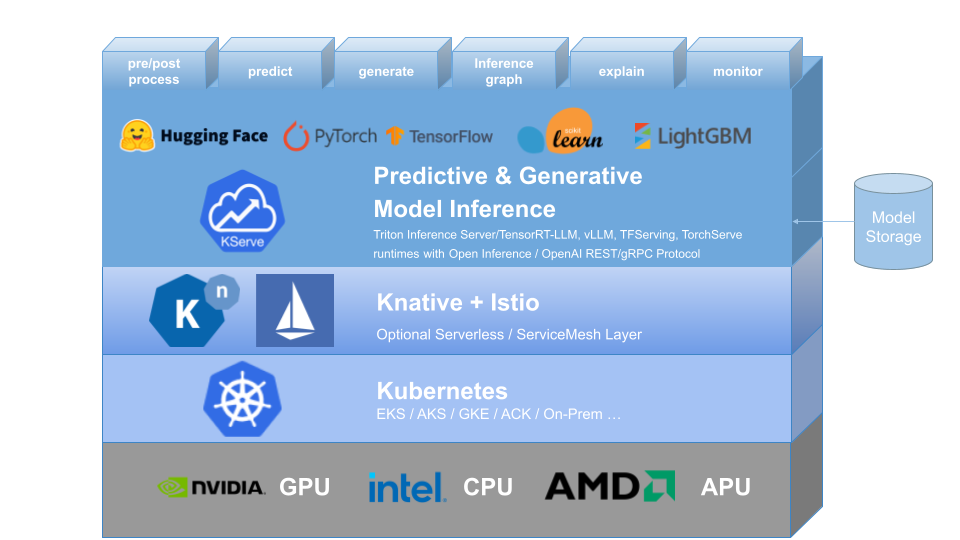
KServe is an open‑source system for serving machine‑learning and generative AI models on Kubernetes.
If you’re a junior–mid‑level data scientist or ML engineer, you’ve probably already hit the “OK, my model works in a notebook… now how do other people use it?” wall. KServe is one of the main answers to that question in Kubernetes‑based environments.
This article walks through what KServe is, how the architecture in the image fits together, and what it looks like to use it in real life.
1. The problem KServe solves
Once a model is trained, teams usually need to:
Turn it into an API for apps, dashboards, or other services
Scale it up and down as traffic changes
Run it on different hardware (CPU, GPU, etc.)
Handle versioning, canary rollouts, and rollbacks
Collect metrics and logs for debugging and monitoring
You can hand‑roll all this: build a Flask/FastAPI service, write Dockerfiles, create Kubernetes Deployments/Services/Ingresses, wire up autoscaling, etc. But it’s repetitive and easy to get wrong, especially when you have many models.
KServe’s goal is to give you a standard, Kubernetes‑native way to deploy and manage models so you focus on model logic, not platform plumbing.
2. Reading the diagram: the stack from bottom to top
The image shows a layered architecture. Let’s walk through it bottom‑up.
2.1 Hardware: GPU / CPU / APU
At the very bottom you see:
NVIDIA – GPU
Intel – CPU
AMD – APU
These are your compute resources. KServe does not replace them; it just helps you use them efficiently:
You can ask for CPUs only for lightweight models.
You can request GPUs when you serve LLMs or heavy deep‑learning models.
Kubernetes schedules pods onto nodes that have the requested resources.
As an ML engineer, this means you express what your model needs; you don’t hard‑code where it runs.
2.2 Kubernetes layer
Next is the Kubernetes block (EKS / AKS / GKE / on‑prem, etc.).
Kubernetes provides the basics:
Containers and pods
Networking between services
Autoscaling at the pod level
ConfigMaps, Secrets, and other configuration
KServe is just another controller running inside your cluster. If you’re comfortable with kubectl and basic Kubernetes concepts (pods, deployments, services), you’re in good shape.
2.3 Knative + Istio layer
Above Kubernetes, the diagram shows Knative + Istio.
KServe relies on these (or similar components) for:
Serverless behavior – scale to zero when idle, scale up when requests arrive
Traffic management – split traffic between two model versions (e.g., 90% old, 10% new)
Ingress and routing – getting HTTP requests into your cluster and to the right model
mTLS and observability (with Istio or another service mesh)
You don’t have to deeply understand Knative or Istio to use KServe day‑to‑day, but it helps to know they are the networking + serverless “engine” underneath.
2.4 KServe: Predictive & Generative Model Inference
This is the big blue layer in the image: “Predictive & Generative Model Inference.”
This is what we usually mean when we say “KServe.”
Here KServe provides:
A standard way to define model endpoints using Kubernetes CRDs
Built‑in support for common ML frameworks, e.g.:
Hugging Face (transformers and LLMs)
PyTorch
TensorFlow
scikit‑learn
XGBoost / LightGBM
Features for the full inference lifecycle (as labeled above the layer):
pre/post process – custom data transformations
predict – standard inference
generate – generative tasks (LLMs, image generation, etc.)
inference graph – chaining multiple models/pipelines
explain – model explanations
monitor – metrics and logging hooks
Under the hood, KServe uses different model servers and runtimes such as:
Triton Inference Server
TensorFlow Serving
TorchServe
Various runtimes that align with Open Inference or OpenAI‑style APIs
You configure which runtime to use in your model spec; KServe wires it into the platform.
2.5 Model storage
On the right, the image shows “Model Storage” – a “bucket” icon.
Your models typically live in:
S3, GCS, Azure Blob, or MinIO
A shared filesystem or volume
Your KServe configuration points at a URI like s3://my-bucket/models/resnet/.
KServe then downloads and loads the model into the right inference server. This keeps model artifacts decoupled from compute so you can update or redeploy without baking models into images every time.
3. KServe’s key concepts (what you actually touch)
From a data science / ML engineering perspective, these are the building blocks you’ll work with.
3.1 InferenceService
The main concept is the InferenceService, a custom Kubernetes resource that represents one logical model endpoint.
Instead of defining a Deployment + Service + Ingress + Autoscaler, you define one InferenceService YAML, and KServe generates everything else.
A simplified example for a PyTorch model:
apiVersion: serving.kserve.io/v1beta1
kind: InferenceService
metadata:
  name: sentiment-analyzer
spec:
  predictor:
    pytorch:
      storageUri: s3://ml-models/sentiment-analyzer/
      resources:
        requests:
          cpu: “1”
          memory: “2Gi”
        limits:
          nvidia.com/gpu: 1
What this tells KServe:
Use the PyTorch built‑in runtime
Load the model from the given S3 path
Request 1 CPU, 2Gi memory, and 1 GPU per pod
Create an HTTP/gRPC endpoint for inference
KServe then handles:
Creating a Knative service
Deploying pods
Autoscaling
Exposing a stable endpoint
3.2 Predictors, Transformers, Explainers
Inside an InferenceService you can define three main components:
Predictor – required
The actual model server (TensorFlow Serving, TorchServe, Triton, or a custom container).
Handles the core
predictorgeneratelogic.
Transformer – optional
A separate container that runs before and/or after the predictor.
Use it for things like:
Tokenization and embedding lookups
Image decoding and normalization
Business‑specific response formatting
It takes in the HTTP request, massages it, calls the predictor, then post‑processes the response.
Explainer – optional
Tied to explainability frameworks (e.g. Alibi Explain).
Exposes a separate
/explainstyle endpoint for feature attributions, counterfactuals, etc.
As a DS/ML engineer, this separation lets you keep model code and data‑wrangling logic nicely separated and reusable.
3.3 Inference graphs
Sometimes you need more than “one request in, one model out”:
Route requests to different model variants based on input
Run a pre‑model (e.g., routing or classification) that decides which expert model to call
Chain an embedding model → vector search → ranking model
KServe’s inference graph feature lets you define a small DAG (directed acyclic graph) of steps: each node can be a model, transformer, or external call. The graph itself is declared as config, which keeps your orchestration logic separate from model code.
For junior/mid‑level folks, you can think of it as “Kubeflow Pipelines, but for online inference instead of batch workflows.”
3.4 Monitoring & scaling
KServe surfaces metrics such as:
Request counts
Latencies
Error rates
These hook into Prometheus/Grafana or whatever observability stack you use. On the scaling side, because KServe is built on Knative, it supports:
Scale to zero (no pods when idle)
Autoscaling based on requests per second, concurrency, etc.
Smooth rollouts and rollbacks using revisions and traffic splitting
You can, for example, send 5% of traffic to a new model version and watch metrics before promoting it.
4. A typical workflow with KServe
Here’s what life usually looks like when you bring a model from training to production using KServe.
Train and export the model
Example: train a binary text classifier in PyTorch and export a
model.ptplus a small TorchServe handler.
Store the model artifact
Upload to
s3://ml-bucket/sentiment/v1/.
Prepare an
InferenceServicespec
apiVersion: serving.kserve.io/v1beta1
kind: InferenceService
metadata:
  name: sentiment-v1
spec:
  predictor:
    pytorch:
      storageUri: s3://ml-bucket/sentiment/v1/
      resources:
        requests:
          cpu: “1”
          memory: “2Gi”
Apply it to the cluster
kubectl apply -f sentiment-v1.yamlWait until it’s ready
kubectl get inferenceservicesOnce the STATUS is
Ready, KServe has set up the underlying service.Call the endpoint
From a client (curl, Python, your app), send HTTP POST requests with the expected JSON shape. KServe routes them through the gateway → Knative → your predictor container.
Update & canary
When you train
sentiment-v2, point a newInferenceService(or new revision) ats3://ml-bucket/sentiment/v2/, then gradually shift traffic from v1 to v2.
5. Why KServe is attractive for DS/ML engineers
For junior to mid‑level professionals, KServe hits a nice balance:
Pros
You don’t need to build REST servers for each model; you reuse battle‑tested runtimes.
Deployment is declarative – one YAML per model.
It handles autoscaling, networking, and versioning for you.
Works with a wide range of frameworks and model types (tabular, vision, NLP, LLMs).
Fits cleanly into MLOps workflows with CI/CD, GitOps, etc.
Trade‑offs
You still need a functioning Kubernetes cluster and basic knowledge of it.
Knative/Istio add complexity; debugging networking issues can be non‑trivial.
Serverless features like scale‑to‑zero introduce cold‑start latency for some workloads.
If your company already uses Kubernetes, leaning into KServe typically reduces the amount of custom serving infrastructure you have to maintain.
6. How to start learning KServe
A practical learning path:
Get a small K8s cluster
Use Kind or Minikube locally, or a small managed cluster.
Install KServe
Follow the official quickstart for your environment.
Deploy a sample model
Use built‑in examples (e.g., sklearn iris, or a simple Hugging Face model).
Call the endpoint from Python and inspect responses.
Add a transformer
Put simple pre‑processing (e.g., text cleaning) into a transformer container and see how the request flow changes.
Experiment with versions & traffic splitting
Deploy v1 and v2 of a model and gradually shift traffic.
By the time you’ve done those steps, the architecture in the image will feel much less abstract—you’ll see exactly how your InferenceService spec flows through KServe, Knative, and Kubernetes down to the hardware.
7. Recap
KServe is the model‑inference layer on top of Kubernetes, built with Knative and often Istio.
It standardizes how you deploy, scale, and manage models (both predictive and generative).
You describe your model endpoint with an
InferenceService: predictors, transformers, explainers, resources, and storage URI.Under the hood, KServe wires together model servers, traffic management, autoscaling, and observability.
For data scientists and ML engineers moving from experimentation into production, learning KServe gives you a powerful mental model—and a practical toolkit—for serving real models in real systems.